DeepSeek Harness: DeepSeek Harness Introduction
Last updated: 2026-08-31
DeepSeek Harness (DSH) is DeepSeek's open-source Agent framework, with the core philosophy of "everything is a plugin" — from model adapters to tool systems, from session management to sandbox mechanisms, all are injected into a shared context as plugins, achieving ultimate extensibility.
📋 Prerequisites: No prior experience needed; basic command-line knowledge is sufficient
1. What You'll Learn
- DeepSeek Harness's positioning and core philosophy
- Cordis plugin architecture: services, events, side effects
- Overview of four running modes (Standard / PTC / Minimal / Creative)
- DSH vs. other Agent frameworks
- Usage considerations during the Developer Preview stage
2. An AI Engineering Team's Selection Story
(1) Pain Point: Agent Framework Fragmentation
Alice is an architect at an AI startup. Her team faced an Agent framework selection dilemma in Q2 2026:
- Claude Code: Anthropic's official CLI, but locked to a single model with no switching
- Cursor: Excellent IDE integration, but Agent capabilities limited by the editor environment
- OpenCode: Open-source CLI tool, but weak plugin ecosystem
- AutoGPT: Concept-first, but insufficient production stability
- LangChain: Flexible orchestration, but high runtime overhead and difficult debugging
Product manager Bob turned up the pressure:
"We need a model-agnostic, plugin-pluggable Agent framework that supports multiple interaction modes. It must go live within three months."
(2) DSH's Solution
After evaluation, Alice chose DeepSeek Harness:
Plugin system:      0 extensible → everything is plugin
Model support:      1 provider → DeepSeek + OpenAI-compatible
Interaction modes:  CLI only → Web UI + CLI + SDK + Headless
Runtime overhead:   high → minimal (Cordis lazy-loading)
Community:          GitHub 187.3k stars, MIT license
DSH's "everything is a plugin" approach let Alice's team assemble capabilities on demand:
- Week 1: Web UI + DeepSeek API to run the first Agent
- Week 3: Connected to an OpenAI-compatible endpoint, switched to GPT-4o
- Week 6: Custom tool plugin, connected to internal company API
- Week 10: Python SDK integrated into the production pipeline
(3) Results
After three months of using DSH:
- Development efficiency: Agent feature release cycle shortened from 2 weeks to 3 days
- Model flexibility: Seamlessly switched between 3 LLMs with zero code changes
- Plugin reuse: 5 teams shared 12 custom plugins
- Operations cost: Headless mode deployment reduced resource usage by 60%
3. What Is DeepSeek Harness?
DeepSeek Harness (DSH) is an open-source Agent framework from the DeepSeek team, with 187.3k stars on GitHub and an MIT license. It's not an Agent itself, but a framework for running Agents — providing infrastructure for model adaptation, tool orchestration, session management, and sandbox execution.
(1) ▶ Example 1
graph TB
    subgraph DSH[DeepSeek Harness]
        C[Cordis Kernel<br/>Plugin Engine]
        M[Model Adapter<br/>DeepSeek / OpenAI]
        T[Tool System<br/>file_edit / shell / search]
        S[Sandbox Engine<br/>Approval & Isolation]
        L[Session Log<br/>append-only log]
    end
    C --> M
    C --> T
    C --> S
    C --> L
    U[User] -->|Web UI / CLI / SDK| DSH
| Dimension | DSH | Traditional Agent Frameworks |
|---|---|---|
| Design philosophy | Everything is a plugin | Hardcoded features |
| Model binding | Model-agnostic | Locked to a specific LLM |
| Extension method | Plugin injection | Modify source code or callbacks |
| Interaction modes | Web/CLI/SDK/Headless | Usually CLI only |
| Runtime | Cordis lazy-loading | Full initialization |
(2) Developer Preview Notes
DSH is currently in developer preview stage, which means:
- APIs may undergo breaking changes in future versions
- Some features are not yet complete (e.g., multimodal, advanced sandbox features)
- Documentation may lag behind code
- Not recommended for direct production use
# Developer preview notice during installation
npx @deepseek-ai/dsh web
# ⚠️ DeepSeek Harness is in developer preview.
# APIs may change before stable release.
However, developer preview doesn't mean it's unusable — core features (conversations, tools, plugins) are stable and functional, and the community is iterating rapidly.
4. Cordis Kernel: Everything Is a Plugin
Cordis is DSH's core framework, named after the Latin word for "heart" — it's the beating center of the entire system.
(1) Plugin Contribution Model
Each plugin contributes three types of content to the Cordis shared context:
interface PluginContribution {
  services: Service[];        // Callable capabilities exposed by the plugin
  events: EventType[];        // Typed event streams
  sideEffects: SideEffect[];  // Reversible side-effect operations
}
- Services: Callable capabilities exposed by plugins, such as
llm.complete(),shell.execute() - Events: Typed event streams, such as
tool.beforeExecute,session.forked - Side Effects: Reversible operations, such as file modifications that can be rolled back or Shell commands that can be undone
(2) ▶ Example 2
graph LR
    P1[LLM Plugin] -->|contributes service| CTX[Shared Context]
    P2[Tool Plugin] -->|contributes service| CTX
    P3[Sandbox Plugin] -->|contributes event| CTX
    P4[Log Plugin] -->|subscribes to event| CTX
    CTX -->|dispatches| P1
    CTX -->|dispatches| P2
    CTX -->|dispatches| P3
    CTX -->|dispatches| P4
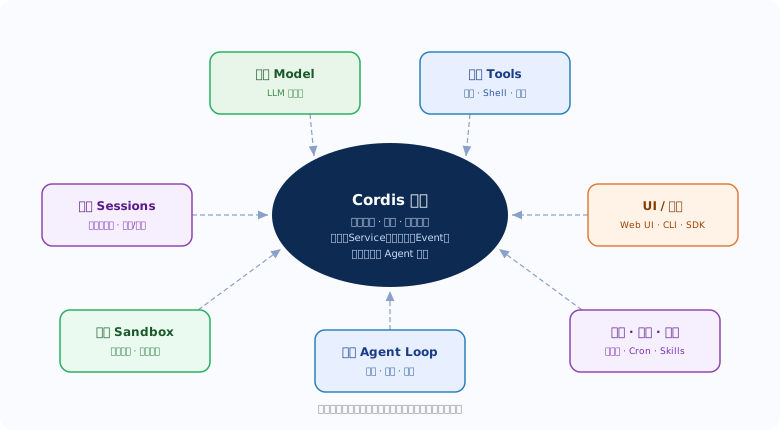
This design ensures:
- Zero direct dependencies between plugins — they communicate indirectly through the shared context
- Adding new plugins requires no modification to existing plugin code
- Side effects are reversible — supporting operation rollback and session restoration
(3) ▶ Example 3
import { definePlugin } from '@deepseek-ai/dsh';

export default definePlugin({
  name: 'hello-dsh',
  version: '1.0.0',
  contribute(ctx) {
    ctx.registerService('hello', {
      greet(name: string) {
        return `Hello, ${name}! Welcome to DSH.`;
      }
    });
    ctx.emit('hello.registered', { timestamp: Date.now() });
  }
});
5. Four Running Modes Overview
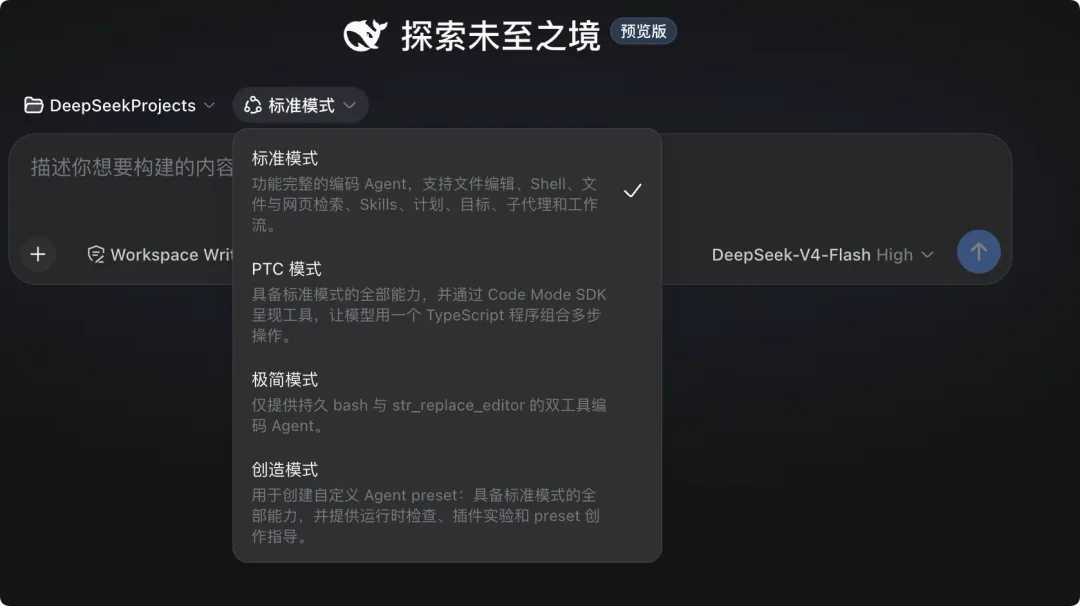
DSH provides four running modes, adapted for different use cases and preferences:
(1) Mode Quick Look
| Mode | Full Name | Characteristics | Use Cases |
|---|---|---|---|
| Standard | Standard | Default mode, Agent autonomously decides when to use tools | General programming, Q&A |
| PTC | Plan-then-Code | Plan first, then execute; plan is visible and controllable | Complex tasks, code refactoring |
| Minimal | Minimal | Fewest tool calls, Agent relies mainly on its own capabilities | Simple Q&A, knowledge queries |
| Creative | Creative | Highest freedom, encourages exploratory output | Creative writing, brainstorming |
(2) Mode Switching
# CLI mode switching
dsh --mode standard
dsh --mode ptc
dsh --mode minimal
dsh --mode creative
In the Web UI, modes can be switched in real-time via the dropdown menu at the top.
graph LR
    USER[User Input] --> MODE{Running Mode}
    MODE -->|standard| S[Agent Autonomous Decision]
    MODE -->|ptc| P[Plan First, Then Code]
    MODE -->|minimal| M[Minimal Tool Calls]
    MODE -->|creative| C[Exploratory Output]
    S --> TOOLS[Tool System]
    P --> TOOLS
    M --> TOOLS
    C --> TOOLS
For detailed mode comparison and configuration, see
04-modes.md.
6. Comparison with Other Agent Frameworks
(1) Core Dimension Comparison
| Dimension | DeepSeek Harness | Claude Code | Cursor | OpenCode |
|---|---|---|---|---|
| Open Source | ✅ MIT | ❌ Closed source | ❌ Closed source | ✅ MIT |
| Model-agnostic | ✅ Multi-model adapter | ❌ Claude only | ❌ Multi-model | ✅ Multi-model |
| Plugin System | ✅ Cordis | ❌ None | ⚠️ Limited | ❌ None |
| Web UI | ✅ Built-in | ❌ CLI only | ✅ IDE-integrated | ❌ CLI only |
| SDK | ✅ Python | ❌ | ❌ | ❌ |
| Headless | ✅ | ❌ | ❌ | ❌ |
| Sandbox | ✅ Configurable | ⚠️ Built-in | ❌ | ❌ |
| GitHub Stars | 187.3k | — | — | — |
(2) DSH's Differentiating Advantages
- Model Freedom: Not locked to any LLM vendor; DeepSeek API and OpenAI-compatible endpoints are plug-and-play
- Plugin Ecosystem: The Cordis architecture turns feature extension into "writing plugins" rather than "modifying source code"
- Multi-channel Interaction: Web UI for beginners, CLI for developers, SDK for integration, Headless for automation
- Reversible Side Effects: Operations can be rolled back, which is extremely rare among Agent frameworks
(3) Scenarios Where DSH Is Not Suitable
- Need 100% production stability (developer preview)
- Pure browser-side operation (DSH requires a Node.js runtime)
- Extremely low-resource environments (the Cordis kernel has basic overhead)
7. Technology Stack Overview
DSH's complete technology stack:
graph TB
    subgraph Interaction Layer
        WEB[Web UI<br/>React + Vite]
        CLI[CLI<br/>Terminal Interaction]
        SDK[Python SDK<br/>Programmatic Access]
        HEAD[Headless<br/>Unattended Execution]
    end
    subgraph Core Layer
        CORDIS[Cordis<br/>Plugin Engine]
        SESSION[Session Manager<br/>Session Management]
        TRAJ[Trajectory<br/>Log Engine]
    end
    subgraph Plugin Layer
        LLM[LLM Adapter<br/>DeepSeek / OpenAI]
        TOOLS[Tool Plugins<br/>file_edit / shell / search]
        SANDBOX[Sandbox Plugin<br/>Approval & Isolation]
        PROFILE[Profile Plugin<br/>Configuration Composition]
    end
    WEB --> CORDIS
    CLI --> CORDIS
    SDK --> CORDIS
    HEAD --> CORDIS
    CORDIS --> SESSION
    CORDIS --> TRAJ
    CORDIS --> LLM
    CORDIS --> TOOLS
    CORDIS --> SANDBOX
    CORDIS --> PROFILE
❓ FAQ
📖 Summary
- DSH is DeepSeek's open-source Agent framework with the core philosophy "everything is a plugin"
- The Cordis kernel achieves plugin decoupling through a shared context: services, events, reversible side effects
- Four running modes adapt to different scenarios: Standard / PTC / Minimal / Creative
- Compared to Claude Code, Cursor, etc., DSH's core advantages are model-agnostic + plugin ecosystem + multi-channel interaction
- Currently in developer preview stage; core features are usable but APIs may change
- GitHub 187.3k stars, MIT open-source license, active community
📝 Exercises
1. ⭐ Basic: Visit DSH's GitHub repository, read the README, list three features that appeal to you most, and explain why.
2. ⭐⭐ Intermediate: Use a table to compare DSH with another Agent tool you're familiar with (e.g., Claude Code, Cursor), including at least 6 comparison dimensions.
3. ⭐⭐⭐ Challenge: Draw a Mermaid architecture diagram showing your understanding of the Cordis plugin contribution model — include at least 3 plugins, annotating the services, events, and side effects they contribute.
